Tennis Dashboard
- tennis announcement never used
- availability kanban is very useful, but medical team is not keeping up with data. Could be re-titled. Take out “no restrictions” for space concerns.
- combine above with “individuals of awareness”
- UTR Overview and USTA — do not recreate.
- Upcoming tournaments — never used
- Junior Rankins and UTR distribution — little used
- Rating trends not used
- All other pre-fab analytics not used
Tennis Admin
-
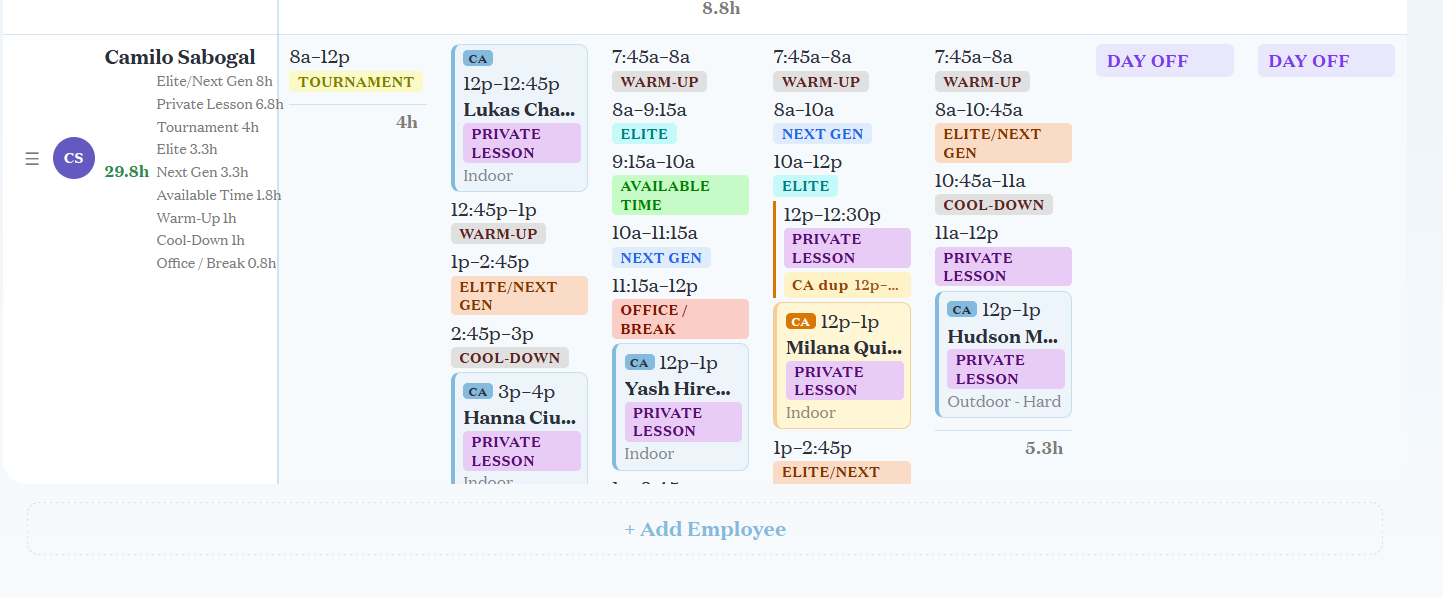
Schedule used all day every day. Available time is not synced with Club Automation. Notifications are not specific enough when something is edited.
-
DO NOW: Fix notifications now
-
Coaches should see the whole calendar but not each other’s hours: (left-hand column, under coaches name, don’t show). POSSIBILITY: Remove the hours view completely, and let all user roles see the calendar (but this isn’t good for Matias).
-
==Day View - looks better than the week view, but the axes are reversed (put coaches on top, times on sidebar)==
-
No other tabs are being used
-
Rippling PTO requests should block off time on the calendar.
Tennis Mastery
- Not used at all, but not being used. Matias has ideas for how to make it better.
- Matias is texting lesson plans
- Kenny wants all of this data. Prioritize after the scheduling is fixed.
- Chart is unreadable on phone and difficult to read on a laptop.
- Main goal is to group kids together based on their needs.
- User Interface is so difficult to use, that Matias resorts to writing notes outside the app and then copying them into texts to coaches. This is disorganized, but easier than navigating the existing UI (which also has limited functionality)
- Matias has a spreadsheet that is too much manual work, but that is much better laid out than the existing app. https://drive.google.com/drive/folders/1wmAiVriLHseSZwS7bmWg72AZJkwzO4nb
- Lessons plans: who is the audience? Are they effective for the coaches, or is it to have data. Think about district lesson plan templates and teacher observations.
- Idea: store videos (currently in Google drive) that are sorted according to skills. Click forehand, see only videos showing work on forehand.
- Big question: how do we track progress?
- Change the UI so that adding, removing, editing, etc from the tracker happens on one screen instead of a different tab.
- UI of “Plans” screen disconnected from their on-court workflow.
Tennis schedule
- not used
Tournament Reports
- Used
Community Tennis & After-School Tennis
- Imported in from Club Automation, but not used. Could be used to track attendance, but they use a spreadsheet instead.
- Useful in the sense that a student is already in the system should they convert to a Full Time Academy student.
- Should possibly track what kind of tennis progression ball the student uses (orange, yellow, green etc.)
Practice Matches
- UI is all over the place, some information is not needed, but it’s getting the job done and sees use.
- Need to automate some of the information (when they practiced, against whom) and pull from the calendar, then send a notification if a score/notes were not input (like interview feedback in Rippling).
- Visiting students are in the practice matches tab to give feedback, etc., but they don’t have a Full Time Academy profile. Should there be a different view for summer students?
General notes
- The names of tabs and sections don’t match the content. When looking for a lesson plan, you don’t think to go to “Tennis Mastery,” when looking at coaches’ schedules, you don’t think to click on “Tennis Admin”
- After school kids should not get a full profile with data analytics, videos, etc. unless they pay extra. Some kids get this, most don’t, but it’s extra work and not driving revenue.
- Plans: three times a year give meetings with a parent for performance reviews. Would like it to be scheduled, formalized, and added into the kids profile. Scheduled during a two-week window. Think Parent-Teacher conference. Perhaps charge if they want more than that.
What features exist that you don’t use or need? What features would you like that don’t exist? What features don’t work well that you wished were better?